Tuesday, April 08, 2008

Ownership

In the enterprise Software Development Project Management thought process there is this concept that software developers are resources.  I suppose from the initial project development that is arguably true, more or less.  But what happens when the project is over; the deliverables have been delivered.  Who supports the project, who maintains the project and who enhances the project?  Basically who is the technical owner or steward?

This is an important part of the "Software Development Life Cycle" that is forgotten, at least where I work.  I recently came off of a fairly successful project where we delivered a fairly standard application - a web based front end that talked to an EJB service that depending on the request would call other "enterprise" services to perform the requested function.  Kind of like the diagram below:
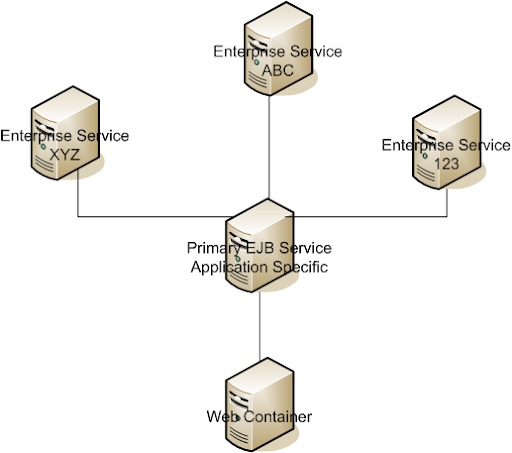
standard


So in the development of this project some of the extended services were already in existence, others were new development efforts.  I had the opportunity to design and implement one of the services.  My intent was for this service to be reused by another application I used to work with, not thinking I would really get the opportunity to see it get reused but I wanted the option to be there.  Well that other applications is getting re-done soon - and I would really like to see that project use the service I wrote for it.

Unfortunately the service I wrote does not really have an owner.  It is out there chugging along quietly behaving by itself so it is pretty much forgotten.  That seems to be pretty typical, when applications work well they are forgotten.  Somehow the concept of project ownership (or maybe stewardship) is a foreign concept in a lot of places.  If someone has developed a service/application they need to be responsible as the steward sure they can transition it to someone lese but applications should never be delivered and forgotten. 

So what does it mean to be a project steward? If you are a steward then you should be the most knowledgeable person on how the application should be evolved and reused.  The steward should be involved when changes are requested or if someone wants to use it.  They should also be responsible for documenting and troubleshooting it.  They don't necessarily have to have the final say in some decisions but their views should be taken seriously. 

When there isn't a steward the services don't get reused and they begin to stagnate, other people start to re-solve the problem the service was written for.  Knowledge is forgotten, documentation isn't written, basically the software dies and that is not good.  Our software creations can only live if we take care of them.  In the world of SOA this part of the equation is forgotten - for services to be maintainable and reusable they have to have someone that is looking out for them.

I think that is why so many open source projects are successful, they have people working on them that care about the project's success and have the sense of responsibility - the end result is owned by them.  Without that commitment software development is not much different from working at McDonald's - you crank out as many cheeseburgers as you can, as quickly as you can.  If some cheeseburgers get undercooked and make people sick - well it's not your fault really....  Someone else is responsible for making sure you do your job right.

We have to have ownership in everything we do - otherwise there is no reason to do anything.  When managers shuffler resources around because resource constraints - all it really does is make a lot of people sick from undercooked cheeseburgers software.


-Aaron

Monday, March 03, 2008

"It didn't kill us, so it must have been ok"

The title of this entry are some fine words of praise I got today.  I left the safety of the Ivory Tower of IT today to grab a snack and ran into the VP of one of the business units that my team developed an application for last year.  I asked how everything was going with the new application and that is what he told me "It didn't kill us, so it must have been ok".  He wasn't talking about just the new applications they just completed the last month of the "busy season" but clearly the applications were not as much of a help as we had hoped.

He then quickly moved into how the business process is changing and how understaffed they were; typical concerns everywhere I guess.  That line of conversation about the business process, prompted a whole line of  thought on the way back.  It's funny how so many of the seasoned, high powered developers seem to scoff and complain about processes.  While on the business side of the house the process is what makes or breaks a company.  Some might even say, that the process of how things are done is what differentiates one player in an industry from another.

It seems odd sometimes that IT gets away with as much as we do.  Breaking processes when we see fit, taking short cuts, the list could go on and on I'm sure.  It makes me wonder how different the "processes" in a software development company is from a company who develops software as a by-product of their business.

Someday I hope I'll be involved with a software solution that at the end of a busy season the user says.  "Wow that worked great! I don't think we would have made it through those last 3 months without that application."  Maybe that is just a dream though...  New applications cause business processes to change and ultimately when it comes down to it everyone hates change, good or bad. 

Maybe in another year the business will say "How did we ever get along without that application?"  Still not glowing praise but at least we wouldn't be compared with death and dying...


Cheers,

-Aaron

Friday, February 29, 2008

Single Sign on with glassfish

Holy cow check out this little nugget taken from the GlassFish manual:


User Authentication for Single Sign-on

The single sign-on feature of the Application Server allows multiple web applications deployed to the same virtual server to share the user authentication state. With single sign-on enabled, users who log in to one web application become implicitly logged into other web applications on the same virtual server that require the same authentication information. Otherwise, users would have to log in separately to each web application whose protected resources they tried to access.

An example application using the single sign-on scenario could be a consolidated airline booking service that searches all airlines and provides links to different airline web sites. Once the user signs on to the consolidated booking service, the user information can be used by each individual airline site without requiring another sign-on.

Single sign-on operates according to the following rules:

  • Single sign-on applies to web applications configured for the same realm and virtual server. The realm is defined by the realm-name element in the web.xml file. For information about virtual servers, see the Sun Java System Application Server Platform Edition 9.0 Administration Guide.
  • As long as users access only unprotected resources in any of the web applications on a virtual server, they are not challenged to authenticate themselves.
  • As soon as a user accesses a protected resource in any web application associated with a virtual server, the user is challenged to authenticate himself or herself, using the login method defined for the web application currently being accessed.
  • Once authenticated, the roles associated with this user are used for access control decisions across all associated web applications, without challenging the user to authenticate to each application individually.
  • When the user logs out of one web application (for example, by invalidating the corresponding session), the user's sessions in all web applications are invalidated. Any subsequent attempt to access a protected resource in any application requires the user to authenticate again.

The single sign-on feature utilizes HTTP cookies to transmit a token that associates each request with the saved user identity, so it can only be used in client environments that support cookies.

To configure single sign-on, set the following properties in the virtual-server element of the domain.xml file:

  • sso-enabled - If false, single sign-on is disabled for this virtual server, and users must authenticate separately to every application on the virtual server. The default is true.
  • sso-max-inactive-seconds - Specifies the time after which a user's single sign-on record becomes eligible for purging if no client activity is received. Since single sign-on applies across several applications on the same virtual server, access to any of the applications keeps the single sign-on record active. The default value is 5 minutes (300 seconds). Higher values provide longer single sign-on persistence for the users at the expense of more memory use on the server.
  • sso-reap-interval-seconds - Specifies the interval between purges of expired single sign-on records. The default value is 60.

Here is an example configuration with all default values:

     
...
<property name="sso-enabled" value="true"/>
<property name="sso-max-inactive-seconds" value="450"/>
<property name="sso-reap-interval-seconds" value="80"/>
</virtual-server>

How sweet is that?


-Aaron

Thursday, February 28, 2008

MD5 Encryption Java style

Here is a little nugget you might enjoy how to do some MD5 Encryption with Java pretty easy really.  Mostly taken from this book:

javaSecurityHandbook


package test.md5.encrypt;

import java.io.ByteArrayInputStream;
import java.security.DigestInputStream;
import java.security.MessageDigest;

import junit.framework.TestCase;

public class TestMessageDigest extends TestCase {
private static String[] hexDigits = {"0", "1", "2", "3",
"4", "5", "6", "7",
"8", "9", "a", "b",
"c", "d", "e", "f"};
public void testEncrypt(){
MessageDigest md = null;
DigestInputStream dis = null;
String digestedString = null;
try{
md = MessageDigest.getInstance("MD5");
ByteArrayInputStream bis =
new ByteArrayInputStream("password".getBytes());
dis = new DigestInputStream(bis, md);

byte[] bytes = new byte[1024];
dis.read(bytes);
md = dis.getMessageDigest();
dis.close();
byte[] digest= md.digest();

digestedString =byteArrayToString(digest);
System.out.println(digestedString);
} catch (Exception e){
e.printStackTrace();
assertTrue(false);
}
}
private String byteToHexString(byte aByte){
int n = aByte;
if (n < 0) n = 256 + n;
int d1 = n/16;
int d2 = n%16;
return hexDigits[d1] + hexDigits[d2];
}
private String byteArrayToString(byte[] bytes){
String result = "";
for (int a = 0; a < bytes.length; a++){
result += byteToHexString(bytes[a]);
}
return result;
}
}


Not too bad is it?  Thanks to Jamie Jaworski and Paule Perrone for authoring that book (heh, I actually got in on clearance for $15.00) not too shabby...


-Aaron

Saturday, February 23, 2008

a wasted week

So, I did say I hated ldap right?  After fighting and fighting with I finally gave in and tried the JDBCRealm with Glassfish's security configuration.

So much nicer.  There is a brilliant post here that explains how to do it.  The only comment I would have is that you can sent the encryption to none instead of MD5 or something else. 

So, yeah I pretty much wasted a week trying to do things the "right" way.  I'm totally digging the JDBC Realm though.  It works just the way you think it should.


Cheers!

-Aaron

Thursday, February 21, 2008

Container Managed LDAP

<sigh> will these ldap posts ever end?

So now that I have authentication working, I want to be able to register users now.  So how can I save users easily to my ldap server?  Well I figured there had to be an easy way to get a container managed instance of the server, low and behold I found this post on making a container managed LDAP from a Java Evangelist.

Once you follow all of those instructions, what is the best way to get access to it?  With Spring of course!

It's as simple as injecting this into your bean

<bean id="ldapServer" 
class="org.springframework.jndi.JndiObjectFactoryBean"
lazy-init="default">
<property name="jndiName">
<value>ldap/directory</value>
</property>
<property name="resourceRef">
<value>false</value>
</property>
</bean>


Couldn't be easier. 

Putting it all together

So, now that I have my ldap server working (more or less).  I need to use it to authenticate with, this turned out to be surprisingly easy with GlassFish.  I created a new LDAP Realm like this:

ldapConfig

The "assign group" property was  a bit confusing - basically it is just a value that you map you application to in the web.xml and the sun-web.xml this is an exampl of how it could be done using the webusers as the value of the "assign group" property.

web.xml:

  <security-constraint>
<web-resource-collection>
<web-resource-name>Faces Servlet</web-resource-name>
<url-pattern>/pages/*</url-pattern>
<http-method>GET</http-method>
<http-method>POST</http-method>
</web-resource-collection>
<auth-constraint>
<role-name>AUTHENTICATED</role-name>
</auth-constraint>
</security-constraint>
<login-config>
<auth-method>FORM</auth-method>
<realm-name>LdapRealm</realm-name>
<form-login-config>
<form-login-page>/login.jsp</form-login-page>
<form-error-page>/unprotected/loginError.jsf</form-error-page>
</form-login-config>
</login-config>


sun-web.xml:


	<security-role-mapping>
<role-name>AUTHENTICATED</role-name>
<group-name>webusers</group-name>
</security-role-mapping>


The last bit of magic is the login form:


<form action="j_security_check" method="post">
<table border="0" cellspacing="0" cellpadding="0">
<tr>
<td>
<p>User ID<br/>
<input type="text" name="j_username" value="" size="10"/>
</p>
</td>
</tr>
<tr><td>
<p>Password<br/>
<input type="text" name="j_password" value="" size="10"/>
</p>
</td>
</tr>
<tr>
<td style="padding-bottom: 10px;">
<p>
<input type="submit" value="Log In"/>
</p>
</td>
</tr>
</table>
</form>


And that is how you can authenticate.  Now if you remember I'm using JSF to manage this and that is clearly not a jsf form.  So this is how I decided to make it work (and there are other options) it is not without problems mind you, JSF makes a lot of things better but in so doing messes up a lot of old conventions.


I have decided to work on the assumption that users are going to navigate to my web site by saying http://www.my great web site.com  I have the welcome page in a "protected" area so that by navigating to the welcome page you will get kicked out the the registration screen if you are successful then you get sent to the welcome page which does a jsp:forward to the welcome page through a faces context.  It is overly complicated I think but we have to make sure that the faces context is initialized correctly.

Thursday, February 14, 2008

OpenLDAP

So I'm not a big fan of LDAP of any kind.  It could entirely be out of ignorance I will admit to that.  It seems very out dated when the info you store can be done SOOOO much easier in a database.


Having said that it seems all "real" applications have an LDAP server back end.  So, tonight I have decided that this is the night when flyingspheres has a working LDAP server.  Not that I really need one mind you it is really just me for the most part, but to really play with security modules in Java you need to have the container working together with an ldap server.

So here we go...

I will be referencing lots of sites to get this work done.  Mostly cause me not so smart when it come to LDAP...

OpenLDAP comes down from the friendly synaptic manager.  Once you get that installed (very easily mind you) you get a new config directory at /etc/ldap which looks like this:


-rw-r--r-- 1 root root  333 2007-04-27 10:19 ldap.conf
drwxr-xr-x 2 root root 4096 2007-12-03 14:05 sasl2
drwxr-xr-x 2 root root 4096 2008-02-08 18:38 schema
-rw------- 1 root root 4340 2008-02-14 21:56 slapd.conf


Now, when I installed OpenLDAP I think my server wasn't named very well so if you were to try and connect to me (and I opened a hole in my firewall) you would see the DN of nodomain.  Heh, is that cool or what?


So first order of business how do I change that?


Sprinkled liberally throughout our slapd.conf file is a reference to nodomain.  This is no doubt a problem.  Before we go mucking around it let's back up that file first... 


... ok backup complete.


Now let's go through and change the cn="nodomain" to cn="flyingspheres",cn="com"  (make sure you get them all).


Ok, that's done.


YoLinux points out that the database our ldap server is under the directory attribute.  By default uBuntu put mine here: "/var/lib/ldap".  Common sense says that's where the nodomain database lives so I'm going to move it somewhere else.  if you look in that /var/lib/ldap directory there is a lot of stuff there.  I wonder what it all is... oh well.... so made my new directory and pointed slapd.conf to it.  I'm hoping that when I restart slapd (openLdap) all that stuff will be created in my new directory.  Once the directory is created and slapd points to the correct location it's time for a restart.  (upon restart there was no love.... my directory was empty... maybe that's ok).


So after about 20 minutes of poking around looking through the OpenLdap link things started working.... I can connect there are db files in the directory defined for the db.  I initially created an ldif file with only the admin user and that worked pretty well, although connecting went through anonymous bind only.


So, many minutes later (maybe an hour or so).  There is a mildly intuitive relationship between the object classes and attributes to what you are wanting to store in your LDAP.  I'm sure if someone reading this knows what they're doing they're laughing now.  You need to pull in the objectClasses that you want into your LDIF file and then add the attributes you care about (and the ones that are required, hopefully they're the same).


I ran the ldapadd probably 50 times trying to figure out the right combination.


Like I said I'm not a real big fan of LDAP...


-Aaron

Tuesday, February 12, 2008

Begin Again

So, I'm starting a new project. 

It never ceases to amaze me how difficult java web applications are to setup.  A lot of it is because of all the different frameworks we get to choose from.  This project appears to be going to use Ice Faces (a JSF implementation/extension), Facelets some level of Spring Integration, possibly JPA or Hibernate.

I played around with RichFaces and facelets a few months ago and was able to lean on the JBoss IDE for some of the configuration, but since I'm using Ice Faces this time I don't want all of the extra stuff that comes with the JBoss IDE.

So we get to start from scratch.  The documentation is pretty decent on what needs to be added to the web.xml and faces-config.xml to get facelets working correctly.  But after that where do you start?  I guess the best place is always the beginning so let's code up the index.html page (always a good place to start).

As you know for faces to work you need to be working w/in a faces context so this is a really good places to initialize the faces context let's make a silly little index.jsp page that simply forwards us inside the context:


<%@ taglib uri="http://java.sun.com/jsf/html" prefix="h" %>
<%@ taglib uri="http://java.sun.com/jsf/core" prefix="f" %>
<html>
<head>
<title>My Title</title>
</head>
<body>
<jsp:forward page="pages/login.jsf" />
</body>
</html>


So, that's easy enough.  But, with Facelets we don't want to really be writing jsf or jsp pages.  Clearly we are forwarding to a jsf page though what gives?  We create a url-pattern mapped to a Faces Servlet so any request to our url pattern (*.jsf) get's routed through the faces context.  One last thing we need to make sure our faces.DefaultSuffix is linked to *.xhtml pages.  So our pages/login.jsf page will land on the pages/login.xhtml page.   Remember with JSF it is all about the faces context stay in the context and you will be ok. This is why (IMHO) if you're doing AJAX you really need to use a framework like RichFaces or IceFaces.  You're just asking for death by a million cuts to go any other route.


So I got all my xhtml files created the web.xml and faces-config.xml are all tweaked out and guess what the dang thing didn't work.  I kept getting this error:


[#|2008-02-12T23:32:08.192-0600|WARNING|sun-appserver9.1|javax.enterprise.system.stream.err|_ThreadID=12;_ThreadName=httpWorkerThread-4848-0;_RequestID=837d6942-3e34-4c0f-b9de-40c1419d7e40;|
java.lang.UnsupportedOperationException
at com.sun.faces.config.ConfigureListener$InitFacesContext.getViewRoot(ConfigureListener.java:1690)
at com.sun.faces.util.MessageFactory.getMessage(MessageFactory.java:113)
at com.sun.faces.util.MessageUtils.getExceptionMessageString(MessageUtils.java:277)
at com.sun.faces.util.Util.createInstance(Util.java:477)
at com.sun.faces.config.ConfigureListener.configure(ConfigureListener.java:671)
at com.sun.faces.config.ConfigureListener.configure(ConfigureListener.java:503)
at com.sun.faces.config.ConfigureListener.contextInitialized(ConfigureListener.java:402)
at org.apache.catalina.core.StandardContext.listenerStart(StandardContext.java:4493)
at org.apache.catalina.core.StandardContext.start(StandardContext.java:5150)
at com.sun.enterprise.web.WebModule.start(WebModule.java:308)
at org.apache.catalina.core.ContainerBase.addChildInternal(ContainerBase.java:960)
at org.apache.catalina.core.ContainerBase.addChild(ContainerBase.java:944)
at org.apache.catalina.core.StandardHost.addChild(StandardHost.java:671)
at com.sun.enterprise.web.WebContainer.loadWebModule(WebContainer.java:1575)
at com.sun.enterprise.web.WebContainer.loadWebModule(WebContainer.java:1216)
at com.sun.enterprise.server.WebModuleDeployEventListener.moduleDeployed(WebModuleDeployEventListener.java:169)
at com.sun.enterprise.server.WebModuleDeployEventListener.moduleDeployed(WebModuleDeployEventListener.java:265)
at com.sun.enterprise.admin.event.AdminEventMulticaster.invokeModuleDeployEventListener(AdminEventMulticaster.java:951)
at com.sun.enterprise.admin.event.AdminEventMulticaster.handleModuleDeployEvent(AdminEventMulticaster.java:938)
at com.sun.enterprise.admin.event.AdminEventMulticaster.processEvent(AdminEventMulticaster.java:448)
at com.sun.enterprise.admin.event.AdminEventMulticaster.multicastEvent(AdminEventMulticaster.java:160)

This seems to be a pretty nasty error, all it is really saying is "Hey I somebody is referencing a class I don't know anything about".  This is probably java's biggest criticism happening right here on my laptop.  I think there are a total of 16 jars I needed to get my very simple page to work here.  Don't get me wrong I'm most thankful to the people who wrote them.  But man it is sure a pain to be trying to figure out what you need and what you don't.


I actually opted for the shotgun approach.  I ended up taking a demo app that comes with Ice Faces and pull out all of the jars from the demo and add them to my project.  Not very accurate but it did fix the problem.


That's enough for tonight.  I'll let you know how it goes.


By the way I got the ice faces demo apps running here:


-Aaron

Tuesday, February 05, 2008

More Recovery

I certainly don't understand the intimate details of all the parts and pieces of the different technologies or applications that I use sometimes.  I have an intermediate level understanding of a lot of the parts such as Apache.  Through trial and error I had figured out how to configure it to do what I wanted it to do.  The old server had MOD_JK installed and would forward some requests over to my GLASSFISH server.  Due to a lack of understanding I had gone through the exercise of compiling apache and mod_jk myself to get it all working.  And I was pretty happy with that, he advantage of doing that is that you know exactly where all the binaries and configuration is and where it's located.

With this version of the server I'm (trying) to use the synaptic package manager and haven't had to compile anything yet.  I simply clicked on Apache in the Synaptic Package Manager and it installed a working version- very simple, very painless.  The configs and htdocs are a bit scattered but I found them eventually.  MOD_JK came down through the synaptic package manager as well.  So what do we need to do to get it all working?  There are several posts that are very helpful:

Amy Roh's from Sun

Jean-Francois Arcand's from Sun


Amy Roh's blog is laid out pretty clearly

Step 1) install MOD_JK (thanks Ubuntu)

Step 2) get the necessary jars from tomcat and put them in the glassfish lib.  I initially installed Tomcat 6.0.14 hoping that it would have the necessary jars but it didn't.  So I had to go get the recommended version (5.5.16) Jean-Francois says you only need tomcat-ajp.jar but Amy Roh's says you need 3 (tomcat-ajp, commons-logging and commons-modeler)

Step 3) enable ajp:

$GLASSFISH_HOME/bin/asadmin create-jvm-options -Dcom.sun.enterprise.web.connector.enableJK=8009

Also you need to define where the properties file is :

$GLASSFISH_HOME/bin/asadmin create-jvm-options -Dcom.sun.enterprise.web.connector.enableJK.propertyFile = <fileName>

That is it sort of... There are a couple of gotcha's on the way, but nothing that is too terribly difficult.  I have to take a lot of things on faith and they usually work but when they don't things get ugly quickly.  The mod_jk needs to be configured in your httpd.conf, also there is a worker.properties file that defines worker's and what they do, and the enabled MODS (taken care of on step one). 

Ubuntu/Apache does have a very fancy set of commands called a2enmod and a2ensite.  If you're wanting to create a virtual host you setup an virtual host file in the site-available directory and call a2ensite on it - a2enmod works about the same... read here if you're interested about it.


Next I think I'll talk about getting websvn and hgweb setup both are pretty cool.  WebSvn has far more features but Mercurial is pretty dang fancy too though...

Talk to ya later.


-A

Saturday, February 02, 2008

Subversion

One of my biggest concerns that I had lost was my source code repository.  Again, not a lot of stuff out there but several projects that were kind of interesting.  The good thing about the way my old server crashed was that the hard drive was intact.  I did a very small amount of research and ran across this article basically you issue a command to dump the old repository and issue another command to import it into a new repository.

Dump:

svnadmin dump /path/to/repo > reponame.dump
tar zcf reponame.tgz reponame.dump
scp reponame.tgz hostname:/path/to/new/repo


Import:

cd /path/to/new
svnadmin create reponame
tar zxf reponame.tgz
svnadmin load reponame < reponame.dump


That was basically the extent of recovering my source code repository.


Sweet!

-Aaron

Recovery In Progress

I had been hosting my own domain www.flyingspheres.com for awhile not much out there really, more of a sand box for me to work in than anything else.  Somewhere around January 5th the computer I was using as server died.  It wouldn't boot or even POST.  I'm still not sure exactly what happened to it.  I attempted to replace the mother board and CPU but do to a serious lack of inclination and knowledge I never got it working and took all the pieces back to where I purchased them. 

I was feeling all bummed about it, worried I had lost a lot of info (source code, database info, etc.). 

And Just the other day I went out to Nebraska Furniture Mart and found a really good deal on a new Desktop PC.  I went ahead and picked it up and have been going through all the recovery issues that I can.  I'm going to try and document the recovery process and setup of this new server in case it happens again....


-Cheers!

Aaron

Wednesday, December 05, 2007

Web Services - Spring Style

Ok, so there is the whole debate about EJB's vs.  Web Services, at least at my company - we have a team of Java developers who want to use EJB's (well sort of) and the Architecture team who is pushing portability/compatibility with web services. 

We use IBM's WebSphere here at work which is both good and bad I suppose - recently I was asked to help out with a Proof - Of - Concept application and wanted to leverage some of the services developed on WebSphere but from a non-WebSphere app server.  Guess what...  IBM won't let you access their services unless you are running under their JDK.  What the heck is up with that IBM?   We're wanting to play with some of the cool stuff that EJB 3/JPA and Annotations can give us but IBM doesn't support that in their JDK's so we can't play at all.

So, I'm playing with web services because I want a service that can be portable and compatible with other languages/frameworks - which comes at a bit of a performance hit - I understand - but it would be nice to have some services that could be accessed from other languages - don't get me wrong I love Java but I like to tinker with Python and Ruby as well....

My only complaint with Spring's Web Services is the build process...

I wrote my first Spring web service to authenticate user's against one of our LDAP servers, now I'm getting ready to write another web service from scratch and thought I'd write a tutorial on it as I go through the steps (note: I have adapted all of the code examples from a project I'm developing for another company so if you seen any misnamed xml namespaces, class files - or anything else let me know I'll fix them up for the next person).

Let's call our new web service...."ApplicationServices"

  • First of all create a Web Project however you like to do that (I like Eclipse so I'm going to be creating a new "Dynamic Web Project" with as few faces as possible - no struts, no jsf, nothing, just a plain vanilla servlet project)
  • My application will be running on GlassFish this is what the initial layout looks like:

projectLayout 

  • For my project I need to expose some functionality that was written to be included in another application.  Luckily it can be bundled up in a Jar and included into our project very easily.  Along with that let's go ahead and add all of our other supporting libraries.  Here is a list of every jar I needed to add for the Spring Web Services framework to work (versioning shouldn't be too terribly critical just don't use anything less than the version listed), along with hibernate as well.:
    • spring-ws-core-1.0.2.jar
    • spring-xml-1.02.jar
    • spring.jar
    • commons-logging.jar
    • commons-collections.jar(hibernate)
    • log4j-1.2.15.jar
    • jdom.jar - get this at JDOM
    • WSDL4j.jar
    • cglib-nodep-2.1_3.jar (hibernate)
    • ehcache-1.2.4.jar (hibernate)
    • hibernate3.jar (hibernate, duh)
    • dom4j-1.6.1.jar (hibernate)
  • Now that we have our libs all setup we need to configure our web.xml file.  Basically we need to map the spring webservice servlet class to a url and load up our config file like this:
    • <?xml version="1.0" encoding="UTF-8"?>
      <web-app id="WebApp_ID" version="2.4"
      xmlns="http://java.sun.com/xml/ns/j2ee"
      xmlns:xsi="http://www.w3.org/2001/XMLSchema-instance"
      xsi:schemaLocation="http://java.sun.com/xml/ns/j2ee http://java.sun.com/xml/ns/j2ee/web-app_2_4.xsd">
      <display-name>ApplicationServices</display-name>
      <servlet>
      <servlet-name>services-ws</servlet-name>
      <servlet-class>org.springframework.ws.transport.http.MessageDispatcherServlet</servlet-class>
      </servlet>
      <servlet-mapping>
      <servlet-name>services-ws</servlet-name>
      <url-pattern>*.wsdl</url-pattern>
      </servlet-mapping>
      <welcome-file-list>
      <welcome-file>index.jsp</welcome-file>
      </welcome-file-list>
      </web-app>

    • So, what is going here?  the <servlet> Tag let's our container know we have a servlet (you probably figured that much out) and then gives us a name to map it with and the class that needs to be loaded for it.
    • Next is the servlet mapping which uses the mapping name we just created and maps that to any requests that come in with a URL that ends with *.wsdl
    • Now this is the important part you MUST name your spring file the name of your servlet so for this example our spring file must be named: services-ws-servlet.xml and it must be in your WEB-INF directory (see the picture up above).
    • To be convenient let's load up a welcome file to see if things are working (don't forget to create the index.jsp file in the WebContent root directory - we will be using it to test with.  You can do something simple like "Hello World" if you want.  I never seem to get tired of seeing that one....

  • Let's go ahead and stub out a spring file and see if our application will even load.  Create a new file called services-ws-servlet.xml in the WEB-INF directory you can fill it up with this:

    • <?xml version="1.0" encoding="UTF-8"?>

      <beans xmlns="http://www.springframework.org/schema/beans"
      xmlns:xsi="http://www.w3.org/2001/XMLSchema-instance"
      xsi:schemaLocation="http://www.springframework.org/schema/beans http://www.springframework.org/schema/beans/spring-beans-2.0.xsd
      http://www.springframework.org/schema/aop http://www.springframework.org/schema/aop/spring-aop-2.0.xsd
      http://www.springframework.org/schema/tx http://www.springframework.org/schema/tx/spring-tx-2.0.xsd
      http://www.springframework.org/schema/jee http://www.springframework.org/schema/jee/spring-jee-2.0.xsd
      http://www.springframework.org/schema/lang http://www.springframework.org/schema/lang/spring-lang-2.0.xsd
      http://www.springframework.org/schema/util http://www.springframework.org/schema/util/spring-util-2.0.xsd" xmlns:tx="http://www.springframework.org/schema/tx" xmlns:aop="http://www.springframework.org/schema/aop" xmlns:lang="http://www.springframework.org/schema/lang" xmlns:jee="http://www.springframework.org/schema/jee" xmlns:util="http://www.springframework.org/schema/util">

      </beans>

    • That should be enough to get us started

  • Go ahead and fire up your container and see if it works.  You shouldn't see any startup exceptions in your logs.  And if you go to the URL of your container probably something like http://localhost:8080/ApplicationServices/index.jsp you should see whatever you content you put in the jsp page - now if you were to jump ahead and go to http://localhost:8080/ApplicationServices/something.wsdl the servlet we configured will load up and you should get a 405 error.
  • If you look at your logs you probably saw an error that said your log4j isn't configured correctly let's throw out a log4j.properties file in our classpath real quick this is the content I typically use:
      log4j.rootLogger=DEBUG, stdout, logfile
      log4j.rootCategory=DEBUG, stdout, logfile

      log4j.appender.stdout=org.apache.log4j.ConsoleAppender
      log4j.appender.stdout.layout=org.apache.log4j.PatternLayout
      # %d = date
      # %p = priority
      # %c = category (class)
      # %m = message
      # %C = class
      # %M = method name
      log4j.appender.stdout.layout.ConversionPattern=%d %p [%c.%M] - %m %n

      log4j.appender.logfile=org.apache.log4j.RollingFileAppender
      log4j.appender.logfile.File=../logs/applications/applicationServices.log
      log4j.appender.logfile.MaxFileSize=1024KB
      log4j.appender.logfile.MaxBackupIndex=5
      log4j.appender.logfile.layout=org.apache.log4j.PatternLayout
      log4j.appender.logfile.layout.ConversionPattern=%d %p [%c] - %m%n

      log4j.category.org.hibernate=WARN
      log4j.category.net.sf.ehcache=WARN
      log4j.category.org.apache.axis=WARN
      log4j.category.org.apache.commons.beanutils=WARN
      log4j.category.org.apache.commons.digester=WARN
      log4j.category.org.apache.catalina.session.ManagerBase=WARN
      log4j.category.org.apache.jasper=WARN
      log4j.category.org.springframework=WARN

  • So let's do something interesting....  Spring Web services recommends using the contract first pattern - basically we configure an xml messsage (or conversation) and use that to drive our service creation instead of having our application drive our xml configuration.  This seems a little backwards but it breaks your XML (or WSDL ultimately) from being tightly coupled to the code behind it (which is a good thing).
  • So we need our service to do something... Let's create some XML to help us think about what we're going to do:

    • Let's create an auto process request object that has an instance name
    • And an auto process response that has a statusCode and a messages field my XML looks like this:
      <autoProcessing  xmlns="http://www.flyingspheres.com/tutorial/services">
      <processRequest
      <instanceName>someInstanceName</instanceName>
      </processRequest>

      <processResponse>
      <statusCode></statusCode>
      <messages></messages>
      </processResponse>
      </autoProcessing>

  • We need to turn that into an xsd document that looks like - a little caveat here there is an amusing statement in the spring webservices tutorial "By far the easiest way to create an XSD is to infer it from sample documents.  Any good XML editor or Java IDE offers this functionality" Oddly enough I couldn't figure out how to get Eclispe or Netbeans to do this either - either I don't know how to use the tool (possible) or they aren't decent editors ( you can decide that one yourself).

    • You could definitely hand tool the XSD it isn't that difficult however... since we want to reduce the hand tooling as much as possible go to HitSoftware and load up your xml file and generate your xsd
    • You should get a response that looks like this:
      <?xml version="1.0" encoding="UTF-8" ?>

      <xs:schema xmlns:xs="http://www.w3.org/2001/XMLSchema">
      <xs:element name="autoProcessing">
      <xs:complextype>
      <xs:sequence>
      <xs:element ref="processRequest" />
      <xs:element ref="processResponse" />
      </xs:sequence>
      </xs:complextype>
      </xs:element>

      <xs:element name="instanceName">
      <xs:complextype mixed="true" />
      </xs:element>

      <xs:element name="messages" type="xs:string" />

      <xs:element name="processRequest">
      <xs:complextype>
      <xs:sequence>
      <xs:element ref="instanceName" />
      </xs:sequence>
      </xs:complextype>
      </xs:element>

      <xs:element name="processResponse">
      <xs:complextype>
      <xs:sequence>
      <xs:element ref="statusCode" />
      <xs:element ref="messages" />
      </xs:sequence>
      </xs:complextype>
      </xs:element>

      <xs:element name="statusCode" type="xs:string" />

      </xs:schema>

  • That got us pretty close but to get to where we need we need to adjust the xsd just a bit let's change it to look like this, oh and put the saved file in your WEB-INF directory: 
    <?xml version="1.0" encoding="UTF-8" ?>

    <xs:schema targetNamespace="http://service.flyingspheres.com/autoProcessing"
    elementFormDefault="qualified"
    xmlns:xs="http://www.w3.org/2001/XMLSchema"
    xmlns:auto="http://service.flyingspheres.com/autoProcessing">
    <xs:element name="autoProcessing">
    <xs:complexType>
    <xs:choice>
    <xs:element ref="auto:processResponse" />
    <xs:element ref="auto:processRequest" />
    </xs:choice>
    </xs:complexType>
    </xs:element>

    <xs:element name="processRequest">
    <xs:complexType>
    <xs:sequence>
    <xs:element ref="auto:instanceName" />
    </xs:sequence>
    </xs:complexType>
    </xs:element>
    <xs:element name="processResponse">
    <xs:complexType>
    <xs:sequence>
    <xs:element ref="auto:messages" />
    <xs:element ref="auto:statusCode" />
    </xs:sequence>
    </xs:complexType>
    </xs:element>
    <xs:element name="instanceName" type="xs:string" />
    <xs:element name="messages" type="xs:string" />
    <xs:element name="statusCode" type="xs:string" />
    </xs:schema>

  • Next we need to flesh out our spring file so that it will do something useful. I highly recommend going out and reading the documentation on the spring web services before you go too far down this path there are a lot of options and a ton of functionality I'm not covering here but you may need to do something very clever that I don't....
  • So this is my spring file:

<?xml version="1.0" encoding="UTF-8"?>

<beans xmlns="http://www.springframework.org/schema/beans"
xmlns:xsi="http://www.w3.org/2001/XMLSchema-instance"
xsi:schemaLocation="http://www.springframework.org/schema/beans http://www.springframework.org/schema/beans/spring-beans-2.0.xsd
http://www.springframework.org/schema/aop http://www.springframework.org/schema/aop/spring-aop-2.0.xsd
http://www.springframework.org/schema/tx http://www.springframework.org/schema/tx/spring-tx-2.0.xsd
http://www.springframework.org/schema/jee http://www.springframework.org/schema/jee/spring-jee-2.0.xsd
http://www.springframework.org/schema/lang http://www.springframework.org/schema/lang/spring-lang-2.0.xsd
http://www.springframework.org/schema/util http://www.springframework.org/schema/util/spring-util-2.0.xsd" xmlns:tx="http://www.springframework.org/schema/tx" xmlns:aop="http://www.springframework.org/schema/aop" xmlns:lang="http://www.springframework.org/schema/lang" xmlns:jee="http://www.springframework.org/schema/jee" xmlns:util="http://www.springframework.org/schema/util">
<import resource="persistence_ioc.xml" />
<!-- WSDL Generation Information -->
<bean id="autoProcessing" class="org.springframework.ws.wsdl.wsdl11.DynamicWsdl11Definition">
<property name="builder">
<description>
The builder creates a WSDL from the a schema.
It detects all elements that ends with 'Request', finds corresponding
'Response' messages, and creates an operation based on that.
        </description>
<bean class="org.springframework.ws.wsdl.wsdl11.builder.XsdBasedSoap11Wsdl4jDefinitionBuilder">
<property name="schema" value="/WEB-INF/mySchemaFile.xsd"/>
<property name="portTypeName" value="processing"/>
<property name="locationUri" value="http://localhost:8080/ApplicationServices/"/>
</bean>
</property>
</bean>

<bean id="servicesEndPoint" class="com.flyingspheres.service.endpoints.ServicesEndPoint">
<constructor-arg ref="autoProcessingService"/>
</bean>

<bean id="autoProcessingService" class="com.flyingspheres.service.AutoProcessingService">

</bean>

<bean class="org.springframework.ws.server.endpoint.mapping.PayloadRootQNameEndpointMapping">
<property name="mappings">
<props>
<prop key="{http://service.flyingspheres.com/processing}Processing">servicesEndPoint</prop>
</props>
</property>
<property name="interceptors">
<list>
<ref local="loggingInterceptor"/>
<ref local="validatingInterceptor"/>
</list>
</property>
    </bean>
<bean id="loggingInterceptor" class="org.springframework.ws.server.endpoint.interceptor.PayloadLoggingInterceptor">
<description>
This interceptor logs the message payload.
</description>
</bean>
<bean id="validatingInterceptor"
class="org.springframework.ws.soap.server.endpoint.interceptor.PayloadValidatingInterceptor">
<description>
This interceptor validates both incoming and outgoing message contents according to the 'echo.xsd' XML
Schema file.
</description>
<property name="schema" value="/WEB-INF/mySchemaFile.xsd"/>
<property name="validateRequest" value="true"/>
<property name="validateResponse" value="true"/>
</bean>
</beans>


    • Details:

      • the autoProcessing bean has defines how the container / client will interact with our service you can access the wsdl by going to the url locationUri/portTypeName.wsdl: http://localhost:8080/ApplicationServices/processing.wsdl obviously this will probably be different for you.
      • servicesEndPoint bean is the entry point for your application, our example uses a constructor arg so that we can control how it is created - this can be done a lot of different ways but this is how the Spring WS tutorial does it so we will follow suit.
      • autoProcessingServices bean is where we will do most of our coding that is what will actually happen
      • The next bean doesn't have a name but is really where the magic happens that kind of maps urls to our endpoints (which ends up calling our service bean).  This line: <prop key="{http://service.flyingspheres.com/processing}processing">servicesEndPoint</prop> is where the url is mapped to our end point
      • Next some interceptors are defined (we'll talk about interceptors and aspects some other day).  For now they're there to do what they look like validation and logging

  • Well if we did everything correctly we should be able to access a wsdl that looks something like this:
    <?xml version="1.0" encoding="UTF-8"?><wsdl:definitions xmlns:wsdl="http://schemas.xmlsoap.org/wsdl/" xmlns:schema="http://service.flyingspheres.com/processing" xmlns:soap="http://schemas.xmlsoap.org/wsdl/soap/" targetNamespace="http://service.flyingspheres.com/processing">
    <wsdl:types>
    <xs:schema xmlns:auto="http://service.flyingspheres.com/processing" xmlns:xs="http://www.w3.org/2001/XMLSchema" elementFormDefault="qualified" targetNamespace="http://service.flyingspheres.com/processing">
    <xs:element name="autoProcessing">
    <xs:complexType>
    <xs:choice>
    <xs:element ref="auto:processResponse"/>
    <xs:element ref="auto:processRequest"/>
    </xs:choice>
    </xs:complexType>
    </xs:element>

    <xs:element name="processRequest">
    <xs:complexType>
    <xs:sequence>
    <xs:element ref="auto:instanceName"/>
    </xs:sequence>
    </xs:complexType>
    </xs:element>
    <xs:element name="processResponse">
    <xs:complexType>
    <xs:sequence>
    <xs:element ref="auto:messages"/>
    <xs:element ref="auto:statusCode"/>
    </xs:sequence>
    </xs:complexType>
    </xs:element>
    <xs:element name="instanceName" type="xs:string"/>
    <xs:element name="messages" type="xs:string"/>
    <xs:element name="statusCode" type="xs:string"/>
    </xs:schema>
    </wsdl:types>
    <wsdl:message name="processRequest">
    <wsdl:part element="schema:processRequest" name="processRequest">
    </wsdl:part>
    </wsdl:message>
    <wsdl:message name="processResponse">
    <wsdl:part element="schema:processResponse" name="processResponse">
    </wsdl:part>
    </wsdl:message>
    <wsdl:portType name="autoProcessing">
    <wsdl:operation name="process">
    <wsdl:input message="schema:processRequest" name="processRequest">
    </wsdl:input>
    <wsdl:output message="schema:processResponse" name="processResponse">
    </wsdl:output>
    </wsdl:operation>
    </wsdl:portType>
    <wsdl:binding name="autoProcessingBinding" type="schema:autoProcessing">
    <soap:binding style="document" transport="http://schemas.xmlsoap.org/soap/http"/>
    <wsdl:operation name="process">
    <soap:operation soapAction=""/>
    <wsdl:input name="processRequest">
    <soap:body use="literal"/>
    </wsdl:input>
    <wsdl:output name="processResponse">
    <soap:body use="literal"/>
    </wsdl:output>
    </wsdl:operation>
    </wsdl:binding>
    <wsdl:service name="autoProcessingService">
    <wsdl:port binding="schema:autoProcessingBinding" name="autoProcessingPort">
    <soap:address location="http://localhost:8080/ApplicationServices/"/>
    </wsdl:port>
    </wsdl:service>
    </wsdl:definitions>

  • We can then take this wsdl and drop it into our client and have it generate the necessary files to call our web services.
  • Before we close this tutorial for now let's talk real quick about the ServicesEndPoint class.    So we told spring that we were going to create a class called com.flyingspheres.service.endpoints.ServicesEndPoint that would extend the AbstractJDomPayloadEndpoint class (by telling spring that it would be called from the org.springframework.ws.server.endpoint.mapping.PayloadRootQNameEndpointMapping class that meant we had to extend the AbstractJDomPayloadEndpoint.  Since we also told spring that we would overload the constructor with our serviceBean we need to define that constructor as well as the methods the PayloadEndpoint forces us to implement.  The Spring WS tutorial section 3.6 does a great job explaining what needs to happen in those methods - so I won't cover that here.  For our needs lets put in some logging like this:
    package com.flyingspheres.service.endpoints;

    import org.apache.commons.logging.Log;
    import org.apache.commons.logging.LogFactory;
    import org.jdom.Element;
    import org.springframework.ws.server.endpoint.AbstractJDomPayloadEndpoint;

    import com.flyingspheres.service.AutoProcessingService;

    public class ServicesEndPoint extends AbstractJDomPayloadEndpoint{
    private static final Log LOG = LogFactory.getLog(ServicesEndPoint.class.getName());
    public ServicesEndPoint(AutoProcessingService service){
    LOG.debug("Entering the constructor with a: " + service.getClass().getName());
    }
    protected Element invokeInternal(Element authenticationRequest) throws Exception {
    LOG.debug("Entering the invokeInternal method with a: " + authenticationRequest.getClass().getName());
    return null;
    }
    }

Well that should be enough to get you started...  Read the tutorial and all of the other documentation as well if you have any questions let me know Aaron at flyingspheres dot com


Happy coding!

Spring Web Services

First of all let me start by saying I love the Spring Framework.  It makes my job a ton easier - things just work better when you use Spring.  One of the things I love about it the most is that when you download it you have the option to download all of the dependencies which is a very extensive list of libraries that cover just about everything (Aspects, Hibernate, Toplink, Axis, Velocity, 62MB of 3rd party libraries) it is very convenient.

However the Spring WebServices Framework opted to use Maven to manage their dependencies if you were to download maven and try to build it you might get an error that looks like this:

mvnError

I don't really care why, and I don't want to learn Maven right now - I'm sure I will eventually right now I just want it to work - and I need a list of required Jars for my web services to work.....


Not a very good experience - if I was not an experienced developer I would probably give up and use something else...

Monday, November 12, 2007

Two Hats

So did you hear the one about 2 hats on a hat rack?


The first one said to the other - "You stay here, I'll go on a head."


get it go on a head....

Friday, November 09, 2007

H:SelectOneMenu

This is the JSF tag that causes me more frustration than just about any other tag.   Probably documented the worst - probably a relation ship there...

So here is an example of the tag:


<h:selectonemenu value="#{selectManager.selectedTheme}">
<a4j:support actionlistener="#{treeManager.filterWorkspaces}"
ajaxsingle="true"
rerender="workspaceTree"
event="onchange">
<f:selectitems value="#{selectManager.themes}">
</h:selectonemenu>


Aside from from the a4j:support tag (we'll talk about that later) it is pretty much a text book example. The problem is what happens in the selectManager. 


We have 2 values we are binding to this component one is the #{selectManager.selectedTheme} and the other is #{selectManager.themes}.  If we take a step back and remember what the HTML select/option guys do we can figure out what is going on the selectedTheme variable is going to be one Object that is submitted on the post - the tricky part is that the themes object supposedly can be a List, an Array , a Set but really you just want to use a List.  Everything else just causes problems.


So the data backing the selectOneMenu is kind of important.  The API and documentation says that you need to use SelectItem objects and when you create a new one it takes an Object and a String (there are other constrcutors but this one works good for me)in it's constructor one is the value the other is the label.  Fair enough...


Here is the really important part the Object for the value really needs to be a String.  Now you can go and jump through all kinds of hoops to write converters and modify all your config files but just make the darn thing a String and be done with it.  If you want to put in your fancy objects I wish you the best of luck but keep the complex stuff in your code not the transmission between the jsps and your controllers.


So, the a4j:support part... this is the fancy stuff that is given to us from ajax4jsf library it makes your select component make ajax calls to the bound listener (#{treeManager.filterWorkspaces}) in our case.  It submits to a method that needs to accept an ActionEvent and return nothing.  Once you get into that method it is super easy to get the selected item - notice the selectOneMenu has a bound value #{selectManager.selectedTheme} that value is updated via the DHTML it has nothing to do with AJAX or form submits anytime you change the select list that value is changed... So when you're in your event method all you have to do is ask the FacesContext what the value is something like this:

SelectManager mgr = (SelectManager)FacesContext.getCurrentInstance().getExternalContext().getRequestMap().get("selectManager");
mgr.getSelectedTheme();


That's it... Pretty easy huh?


-Aaron

My New Java Shirt

Check out my new Java shirt! You're probably jealous now aren't you.

Thursday, November 08, 2007

Java Server Faces and AJAX

So, to carry on the theme from the previous post I've been playing with JSF quite a bit lately.  I've recently been moved over to the Architecture team and this team isn't so Java savvy.  They do learn quickly they/we are working on a proof of concept application and they opted to do Spring MVC in lieu of Java Server Faces.  Mostly do to the very steep learning curve; they wanted to learn something fairly easy to help meet their delivery dates.  Since they don't have much of any Java experience it was probably a wise choice.

Except for the fact that the development team that they are supposedly leading doesn't use Spring MVC for anything!!!  The dev team is a strict Struts shop until the last project that I did which introduced JSF, which seemed to be a very successful experience, although a rather painful learning curve.

Having said that what exactly does it mean to have a standard if the people that should be defining don't follow it?  <- that is mostly just a complaining kind of question I suppose.

My real question is with all of the web frameworks out there (and that isn't even a comprehensive list, especially if you start looking at various JSF Implementations ) how can you ever decide what should be your company's standard?  A search of JSF at Dice dot com shows 1,605 jobs Struts has 2,318.  I'm sure there is a bit of cross over but that is a significant difference.  Supposedly JSF is the direction the industry is moving towards - in fact IBM is not longer actively supporting Struts on their portal servers, so I guess that must mean something.

So why do enterprise development teams set standards if the technology moves so quickly?  As soon as you set them they're out of date...  So why then?

  • Performance
  • Scalability
  • Stability
  • Development Speed
  • Easily found skill set
  • Licensing
  • Support Structure
  • Long term viability of the technology

I guess that is a decent list - not terribly comprehensive but things to think about when deciding on a standard.  What things would you think about?  What frameworks are standard where you work?

Monday, November 05, 2007

JPA Code Examples

So here are the goodies:

first you need to make your persistence.xml file look kind of like this:

<?xml version="1.0" encoding="UTF-8"?>
<persistence xmlns="http://java.sun.com/xml/ns/persistence" xmlns:xsi="http://www.w3.org/2001/XMLSchema-instance" version="1.0" xsi:schemalocation="http://java.sun.com/xml/ns/persistence http://java.sun.com/xml/ns/persistence/persistence_1_0.xsd">
<persistence-unit name="TestJPA">
<provider>org.hibernate.ejb.HibernatePersistence</provider>
<class>com.agnostic.software.jpa.entities.Users</class>
<properties>
<property name="hibernate.connection.driver_class" value="org.gjt.mm.mysql.Driver"></property>
<property name="hibernate.connection.url" value="jdbc:mysql://serverName/dbName"></property>
<property name="hibernate.connection.username" value="webUser"></property>
<property name="hibernate.connection.password" value="myPassword"></property>
<property name="hibernate.dialect" value="org.hibernate.dialect.MySQLDialect"></property>
</properties>
</persistence-unit>
</persistence>


Notice the properties section and the lack of jta-data-source tag, this will create a problem if you want to use this persistence file to deploy to the app server.


Your Entities won't need to change, they'll work the same. 


Your Junit tests can be configured lots of ways but this is how I did mine:

public class TestUsers extends TestCase {
private EntityManagerFactory emf;
private EntityManager em;
@Override
protected void setUp() throws Exception {
emf = Persistence.createEntityManagerFactory("TestJPA");
em = emf.createEntityManager();
}
public void testRetrieveUsers(){
em.getTransaction().begin();

List<Users> users = null;
try{
Query query = em.createQuery("Select u from Users u");
users = (List<Users>)query.getResultList();
} catch (Exception e){
e.printStackTrace();
}
assertNotNull(users);
for (Users u : users){
System.out.println(u);
}
System.out.println("returning: " + users.size() + " users");
em.close();
emf.close();
}
}

That is it in a nutshell, I'm surprised that this isn't documented somewhere better but here it is for your testing enjoyment... So don't give me any excuses test that code!

Testing JPA

So, I've gotten very comfortable with the whole Spring/Hibernate mashup.  I really can't think of a better way to do database transactions than using hibernate to map the database and Spring to inject the Hibernate sessions into which ever component needs it.  It is simple and it just simply works...


One of my favorite things about using Hibernate is the Criteria search capabilities.  Basically it is a very OO way to do simple queries - you can get kind of clever with them but for the most part simple is better.   And in my opinion if you're writing queries that can't be done with Criteria's your data model probably sucks and needs to be re-worked... like that is ever an option.


Anyway I've recently joined the Architecture team and I was having a conversation espousing the glory and ease of use of these criteria's when somebody popped their head up over the cube wall and said "Why would you use Criteria's anyway they're not supported by the JPA specification."


Which is unfortunately true... for now anyway.


So, my last project was with JSF which was delivered successfully but it was extremely painful.  Mostly due to IBM's horrible implementation with their 5.0 portal server - heh, yeah it was even jdk1.3 how cool is that?


As that project is closing off I've been thinking on some of the pain points of that my team and I went through.  This contemplation led me to SEAM which led me to EJB3 and JPA.


So that's twice that JPA has come up recently so I decided to start poking around and see if I can figure the new specification out.  Indeed I have lost my beloved criteria's and once again an forced to contaminate my java code with SQL like syntax.  I can live without that temporarily anyway as long as I have a robust testing model.  So far the best I've seen is integrating with Spring to do it.  But isn't EJB3 supposed to handle the IOC for me? 


So after more searching than their should have been I found this article that takes you to a Sun Tutorial on desktop Java so with just a little bit massaging I can now run Junit test cases with just JPA, very sweet...